xlwings lite |Connect to Remote Databases
Published: April 7, 2025

Automate, pull, analyze, report, chart, model.
Check out detailed info REX AI Co Analyst site
- Full templates
- How-to guides
- Backend code
- Technical breakdowns
- Resource Links
Detailed info , source codes, how-to guides, resources and templates available on REX
Python in Excel: with a mini code editor sitting inside Excel, a robust Excel objects model and a simple setup, xlwings Lite has nailed it. One of my primary tools now - alongwith Colab, Cursor, and Jupyter+Mito AI.
In this Part 2 on xlwings Lite, I show another powerful feature - API calls…lets you connect to any external system with API access.
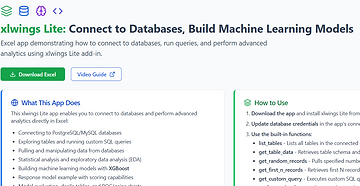
In this demo: connect to a remote Postgres database, explore tables, pull records, and run custom SQL - all from Excel, using a simple spreadsheet interface. Excellent for automated data pulls and DB updates too.
Once data is pulled, we run exploratory data analysis with extended descriptive stats, frequency tables, distribution plots, charts - followed by an XGBoost response model with evaluation sheet, decile table, ROC/Gains chart, and scoring.
This is demo with mock data, but shows how xlwings Lite handles:
- Complex Python workflows
- External system connections via API
- Remote database connections
- Excel object manipulation - sheets, rows, columns
- Advanced automation
- Excel-based tools with Excel as the UI
- Custom tables, reports, and charts
- Statistical analysis
- Machine learning model builds
Remote DB Connections
Requires a web layer - easy to manage. I use a custom built FastAPI server (open source), which you're free to use (just note: your credentials would pass through my server) - or you can deploy your own. Takes just a few minutes on Render. It's a reusable component I use to connect any frontend or UI to backend databases. I've covered this in earlier posts and videos - links in comments
API Calls to LLMs
Not covered in this video, but I've also tested API calls to OpenAI, Gemini, and Claude Sonnet using JSON schemas for structured output. Big deal for automation. Planning to cover this in a future part. But it's essentially the same - straightforward API call, parse the response, use it in your workflow.
Instructions for AI Coders / LLMs
For humans too. In my Github Repo.
xlwings Lite
From Felix Zumstein, creator of the original xlwings - a solid, established Python package for Excel automation. He's laid out a strong roadmap and shared excellent documentation covering usage, API reference, limitations, and comparisons with other Python-in-Excel tools.
Video
Full 20 minute video on YouTube with timestamps: Demo, Caveats, FastAPI setup & Code Walkthrough
AI Co-Analyst: explore 15+ open-source AI analytics apps at tigzig.com - AI Advanced Analysis App: https://lnkd.in/g8xPQvb8
AI Automation Micro App - Fund Disclosures Excel to CSV https://lnkd.in/gxVbCdpv
GitHub repo with demo files and scripts for xlwings Lite
https://github.com/amararun/shared-xlwings-docs
FastAPI Server - Latest Code
https://github.com/amararun/shared-fastapi-rex-db-coolify
FastAPI Server - How to Deploy on Render
This guide shows how to connect ChatGPT with Supabase. The Render deployment steps are the same - just use the latest code (above). No environment variables needed. For live use cases, API keys and additional security advised.
Get free Postgres / MySQL database quickly
- neon.tech - Postgres database, instantly available. 500MB free.
- Supabase - Postgres with auth, API, storage. 500MB free tier.
- Aiven - Postgres and MySQL. 5GB free tier.
xlwings Lite official site: lite.xlwings.org