Can an AI SQL Agent build a weighted scoring system from scratch?
Published: September 15, 2025
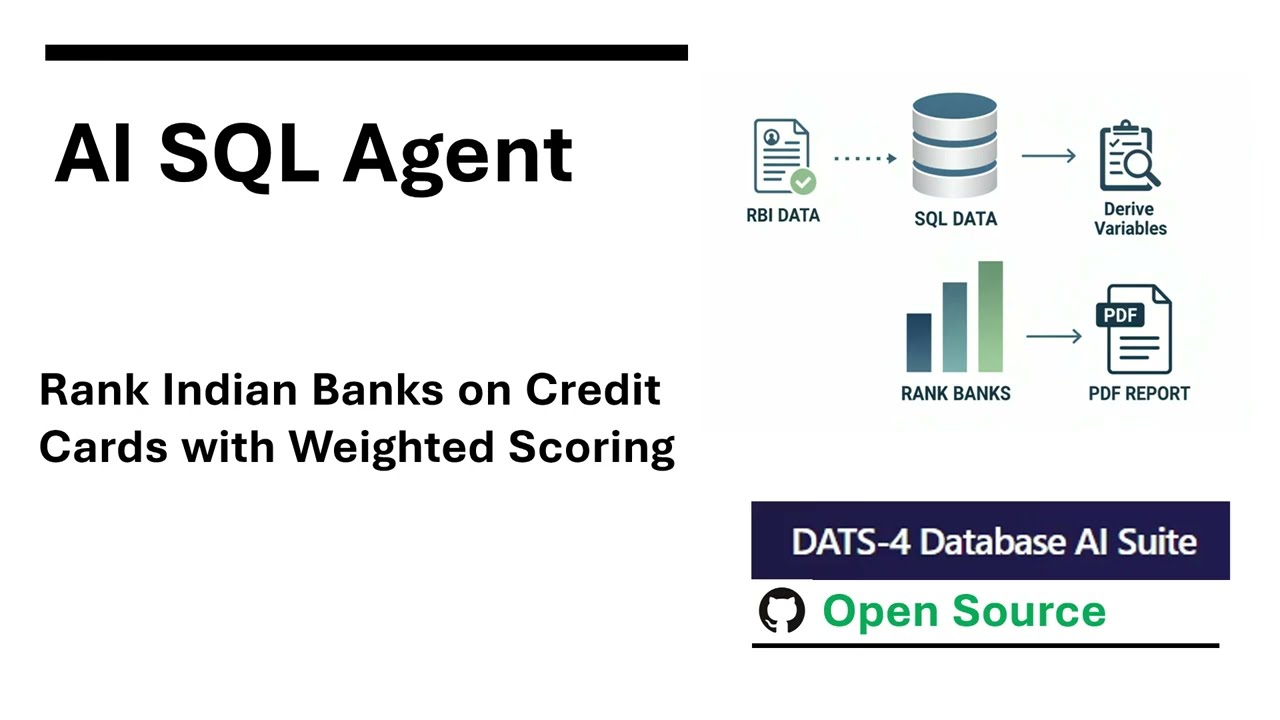
Try it yourself. I'm sharing RBI data + instructions. Run it on DATS-4 SQL Agent and get a full analysis as multi-page PDF report.
A common analytics task → subjective segmentation and ranking.
The Data
Reserve Bank of India, Monthly ATM/POS/Cards Stats, July 2025.
RBI publishes this as Excel. If you need CSV: use my Excel-to-CSV RBICC converter tool: www.tigzig.com/rbi-cards
The Task
- Create a weighted composite score to rank Indian banks on credit cards.
- Derive ratios and new variables to support the ranking.
How to Run It
1. Go to DATS-4 → www.tigzig.com → Database AI & SQL Apps → DATS-4.
- Click Try Sample → Select dataset → Use Temporary Database. Zero setup.
2. Give the Instructions → Copy the provided prompt.
- The ask: rank banks, design a scoring system, derive new variables, generate charts, and explain the process.
3. Review Analysis → Agent shares full plan, SQL, debugging steps, and reasoning.
4. Iterate → Adjust weights or logic. Rerun to see updated results.
5. Get Report → Ask for PDF output in A4 width (Supports text only for now)
Reality Check
Live work isn't click-click and out pops a PDF. This is the final 5%. In live projects, the 95% is:
- Data Marts & Cleaning → recons, data cleaning, data formats, joining vars
- Agent Setup → agents misfire, over-query, miss variables. Getting reliable behavior is iterative and sometimes frustrating.
- Infra → UI, backends, monitoring, auth, access controls, costing
- Security → The public facing app routes all API calls via my backend. Use it for sandbox testing only. For live deploy: run on your own VPN / harden auth.
Data Size
This example uses a 64-row aggregated file. The reasoning process is the same whether 64 rows or 64M. For larger workloads, see my previous cricket data post, and earlier posts on agents running analytics across multiple tables with millions of records.
DATS-4 is fully functional and Open Source
- Source Code → Docs → Build It (on app site)
- AI SQL Apps → voice-connected, ChatGPT-to-database, rapid deploy options
- SQL Agent Field Guide → 49 pages of practical setup guidance. Download PDF
Full Deck Content (Text Format)
Text below was extracted from the source deck. Chart visuals stay in the PDF and as slide images above the post.
Field Guide
15+ Months of Client Operations
Connect to databases, analyze and visualize with natural language to SQL
Live App: www.tigzig.com
Deploying AI on Databases
Lessons
Live Apps (4 Variants – 8 Apps)
Source Code
DATS-4: Database AI Suite – Version 4
GPT-5: Initial Assessment & Live Integration
Deployments
Build by Practitioner. Built for Business: The DATS-4 suite is built by a data scientist for internal teams. The design prioritizes analytical agility and rapid deployment in secure SMB environments. This involves different trade-offs than the standards for large-scale enterprise software.
Live History: The first client deployment was in April 2024. There are currently 9 live, customized versions running across 3 SMB clients.
Implementation Variants: Client projects vary based on need-specific components only, custom GPTs connected to databases, rapid-deploy version & customizations.
The Public App (www.tigzig.com): Fully functional version of the suite. It has been configured as a minimal security sandbox to allow for unrestricted testing of the core features.
Live Project Checklist: ALL client projects include a mandatory checklist: security layers, semantic model, fixed database connections, and disabling of admin features for end users
DATS-4 Evolution
Database AI Suite – Version 4
| OSS Release | Name | Additional Features
V1 | Jun ’24 | Analytics Assistant App | Flowise UI + FastAPI for Text-to-SQL MySQL support Python charts & stats ChatGPT connected to Databases
V2 | Nov’24 | REX-2 | React UI Flowise chatflow backend Postgres support Interactive grid Direct file upload to DB PDF reports Quick analysis options OAuth
V3 | Feb’25 | REX-3 | Multi-step reasoning based analysis Choice of multiple LLM Flowise sequential agent backend Agent reasoning view Quick try sample functionality Logs
V4 | Aug’25 | DATS -4 | Flowise new multi agent backend Updated LLM Choices w/ GPT-5 Database table export & CSV Download Export to PDF (Text only) Updated UI Portfolio analyst integration
Field Report: GPT-5 First Look
From my experience, new model releases often have higher, volatile latencies and costs in the first days or weeks, then stabilize over time.
My preliminary assessment of GPT-5 first few days of release
Reasoning & Analysis: close to Claude Sonnet 4
Latencies: higher - temporary phenomenon
Costs: higher than expected : temporary phenomenon
Variance: Given the amount of variance I am seeing with GPT-5, cost estimates would not be reliable. I am holding off on sharing exact cost estimates for GPT-5 for the time being. But based on published rates, I expect them to stabilize around the GPT-4.1 levels
Integration: At the same time, I have incorporated GPT-5 as an LLM Choice options in the public DATS-4 for users to try out and compare results
Detailed cost comparisons and model choices are covered in the LLM section later in this guide
I typically migrate clients only once I am confident that the model performance, cost and latencies have stabilized.
1. Lessons
Security
Datamart & Context
Agent Setups
LLM Choices
LLM Cost
Usage Patterns
Platforms
Security
Align with rules – set by DB and server admins. They are troublesome but will save your bacon one day.
No end user touches the raw tables– even with SELECT access
Separate user ID’s at DB level with fine grained permissions
Row Level Security – use with Postgres
Separate : schemas / database / views for say Finance vs. Marketing. The additional maintenance effort is worth it.
Authentication: OAuth / API Keys
Log all API calls : push to a DB / 3rd party tools
IP / Domain Whitelist : FastAPI / DBs / Agents / all end-points
CORS : for all FastAPI, with domain whitelist
Resource Limits for CPU & Memory – implement on server
Rate Limits: at FastAPI (with SlowAPI) and Agent end
Server: Firewalls, only SSH, Fail2Ban, IP Whitelists etc.
VPNs: default deployment always on a client VPN.
Security is expensive – direct cost, bandwidth and business opportunity loss. Every layer adds cost and user friction. Assess risk of breach for each data item, worse cases and potential impact. Apply layers accordingly. Everything is not catastrophic.
Building the Foundation Datamarts and AI Context
Datamarts
Creating usable datamarts is one of the most time consuming things, especially the data cleaning and validating against reported numbers.
Need to know: create custom datamarts and views for specific use cases. Operate on need to know basis.
Auto Refresh: setup auto refresh of datamarts
Validation reports: validation reports for all datamart refreshes is mandatory
Be alert: After running for months, a validation can suddenly fail out of the blue. You must be ready to catch it.
Context
Use system prompt to provide context to AI
Sample rows
Univariates for numerics & distributions for categoricals
Business rules and business context
Golden queries – sample queries for common requests, particularly for the more complex queries
Output formats / row limits / data gotchas
Agent Setup
Agent backend on Flowise AI, with conditional routing based on type of request. A multi-sequential agent setup
Conditional routing agent will route to advanced analyst or general analyst based on a set of guidelines or if specifically instructed by user
Agent Setup
The Dispatcher (Conditional Router Agent)This is the gatekeeper. Its only job is to analyze the user's request and route it to correct specialist agent based on a set of rules.
The Workhorse (General Analyst Agent)This is GPT-4.1 mini - optimized for execution speed. It handles the majority of requests: direct SQL queries, data pulls, and standard charts. It does not perform multi-step reasoning. It directly executes, validates, and returns the result.
The Specialist (Advanced Analyst)This is a two-step routing, used only for complex requests that require reasoning.A. The Planner: First, a reasoning-focused LLM (choice of LLMs) creates a step-by-step analysis plan, including the exact SQL and python code required.B. The Executor Agent: This is GPT-4.1 in all cases - reviews and executes that plan, performing final error checks and formatting the output.
The Executor agent will be upgraded to GPT-5 series once its cost and latency have stabilized
Equipping the Agents: Core Tools
- Database Connect
Custom FastAPI Server
Allows agent to connect to database to execute SQL queries
- e2b Code Interpreter
Flowise built-in tool
Python sandbox
To create charts and run statistical analysis
- Markdown to PDF
MCP Server
To create PDF (text only) output. The agent sends markdown to the MCP Server, which returns a PDF file path.
The core DATS-4 agent uses three primary tools:
The system is modular, allowing other tools to be plugged in as needed: web scrapers, Excel updaters, report emailers, file converters, custom automations and more.
Agent Orchestration
No 100% : You will never get 100% what you instruct 100% of the time. Test and determine what variance you can live with.
Edge cases: test edge cases and outliers. Calibrate instruction till you get your desired outcome
Break it : Push it to limits. See where it trips and falls.
Reasoning required ? – if so , specify . Not always required.
Number of Queries – CRITICAL to specify a cap on number of SQL queries an agent can run for a single question.
CREATE / ALTER/ DROP : specify if they are allowed or not
Temporary tables : specify if permitted and how (CREATE TEMP or CREATE TABLE) , and cleanup protocols
Limit clause: how many rows ? When to use ? When not?
Division by zero: common error – COALESCE(), NULLIF() etc
Debug : debugging protocol for query failures
Reminders help – remind to check for common issues – missing table, table exists, joins, data type mismatches etc
To get an agent to deliver the right outcome, you have to test and calibrate- sometimes 100s of times. It's the only way. The are the rules I follow
Agent Backend
Don’t reinvent the wheel.
Don’t reinvent the wheel: use tools like Flowise/ n8n as first choice- they take care of many nuances out-of-box. Connect user interface via API calls.
Flowise AI: is my first choice. Robust out-of-box memory and state management and numerous other features. Great for complex agent workflow, especially for sequential flows.
n8n – for app integrations and where Flowise not the best fit.
Hard-coded agents: used only for functionality that framework tools can't support.
LLM Choices
For end-user applications, use frontline providers (OpenAI, Google, Anthropic). They offer the best combination of reliability, consistency, quality and pricing. For internal analytics work – practitioners should test and use other models per their own judgment.
My Top Recommendations
SQL Executions: GPT-4.1 (GPT-5 once stable) for complex and 4.1-mini (GPT-5-mini once stable) for rest. GPT-4o-mini is excellent for simpler and repetitive requests.
Tool use: for all tool use functions, OpenAI’s GPT models - effective, reliable and cost efficient
Non-Tool LLM use: Gemini Flash 2.0/ 2.5 as first choice for non tool tasks - e.g. automations, schema detection, reasoning, planning
Complex: Claude Sonnet 4 for the hardest and most complex tasks
Other LLMs: DATS-4 provides LLM choices including DeepSeek, Qwen & GLM. Great quality and pricing. But I see a lot of variance in billed cost and latencies. DATS-4 allows for easy integration of other LLMs
LLM Costs: Guidelines
Use Case: Always estimate for your specific use case. Review actual charged API costs. Don’t rely on published rate.
Lowest Cost: GPT-4o mini and Gemini Flash 2.0 are older model, but robust, lowest cost and great for many tasks. Test them first
Value: GPT-4.1-mini (GPT-5-mini once stable) and Gemini Flash 2.5 - great workhorses at reasonable cost.
GPT-4.1 for harder tasks especially complex SQL executions (GPT-5 once stable)
Claude Sonnet 4.0 is an all rounder and the best, but expensive. Keep for most complex reasoning.
DeepSeek. Qwen, GLM and others – High latency and cost variance based on provider. DeepSeek more stable now.
Single step agents for direct questions = low cost.
Multi-step agents = exponential cost increase. Use with care. See next sections
Number of SQL queries an agent is allowed has direct cost impact. 2 queries per question vs. 10 queries= 5x cost
Context – piles up with same session adding to cost. New question = open new session
LLM Costs: 1 Question 1 Query
LLM | ~USD | Remarks
GPT-5 | Volatile | New release - high variance. Expect to stabilize around GPT 4.1 levels
GPT-4.1 | 2.0 | Best for complex SQLs
GPT-4.1-mini | 0.50 | Great for med. complexity SQL
GPT-4o- mini | 0.25 | Great for simple/ med. complex
Cost Per 100 Simple Questions
1 Question = 1 SQL Queries/ Tool Call
Single step: no reasoning step, direct execution
Example of single question
Share sample rows
Add new columns as per instructions
Join Table A & B by cust_id
Summarize by housing and show counts
Share chart for housing summary
Actual vary by use case and the agent setup. Always estimate for your use cases and compare vs. actuals.
For all estimates – keep in mind that as context increases the cost goes higher
~USD per 100 Q
LLM Costs : Advanced Analysis
~USD per 100 Q
Reasoning Model | Quality Score | Logic USD | Exec. USD | Total USD | Remarks
Gemini Flash 2.0 | 75 | 0.25 | 12.5 | 12.75 | Best value
Gemini Flash 2.5 | 75 | 1.75 | 12.5 | 14.25 | Next after Flash 2.0
Gemini Pro 2.5 | 85 | 8.50 | 12.5 | 21.00 | Avoid. V.High.Cost
Claude Sonnet 4 | 100 | 6.50 | 12.5 | 19.00 | Topmost Quality
DeepSeek R1 | 90 | 2.25 | 12.5 | 14.75 | Great Value
Qwen 3 | 75 | 3.50 | 12.5 | 13.25 | High variances
GLM 4.5 | 80 | 1.00 | 12.5 | 13.50 | High variances
o4-Mini | 75 | 2.75 | 12.5 | 15.25 | Avoid.
GPT-4.1 | 90 | 3.00 | 12.5 | 15.50 | Great Value
GPT-5 | 95 | Volatile | | | Top Quality
Example of one Advanced Analysis Question (shortened)
Create Weighted Average score based on available variables
Modelling Data Mart : Take transaction table, summarize based on cust_id and create derived variables. Summarize and merge with customer data to create a modelling data mart
In multi-step reasoning-based analysis, execution cost is biggest chunk due to multiple tool calls.
1 Question = 7-10 SQL Queries / Tool Calls.
All executions by GPT-4.1. GPT-5 costs, once stable, likely to be around same levels.
Time: ~2-3 mins per que. Can go upto 10m. Varies by question.
Advanced Analysis: Costs Vs. Quality Matrix
Claude Sonnet-4 and GPT-5 are top-tier models for advanced reasoning.
Estimates based on live deployments & 250+ test runs
Quality scores are a judgment-based assessment of the model's analytical reasoning depth
Estimates vary – always estimate and check actuals for your use cases
*** GPT-5 is plotted at its projected stabilized cost (equal to GPT-4.1) for quality comparison only. Current costs are volatile and are not plotted..
Warning: The Cost Multipliers of Multi-Step Agents
No. of Steps: 2 Step = double the context = 2X the cost
Number of tool calls Determined by # of SQL Queries allowedSimple Question = 1 SQL QueryAnalysis Question = 2 to 10+ SQL Queries=10X cost
Execution ModelNeeds stronger model GPT 4.1 vs 4.1 mini = 5X
Additional LLM Cost for reasoning- ~ 7 cents per question for Sonnet 4
Context is a Multiplier, not an addition: larger semantic models, context, and system instructions don't just add to the cost; they multiply it with every step
DebuggingIn case of SQL query error - LLM will auto debug and re-run, taking up additional tool calls and costs.
For multi-step analysis, costs don't just go up; they escalate exponentially - from 10X to 50X or more. This is a critical budget risk. Key factors:
Usage Patterns
The highest adoption I see is from operations, marketing, and finance teams. The following are the most common usage patterns from my client deployments
Operations, Marketing & Finance Teams
Natural language interface to backend datasets and uploaded CSV files
Pull specific customer and transactions records for review
Recon between finance and ops data
Insert / Update / Delete records
Download filtered data for offline analysis in Excel
Append fields and field cleanups
Generate summary reports with standard prompts for reuse
Generate PDF output
Many users prefer AI interface over their existing interfaces given the range of operations they can carry out and the efficiency of direct integration with automations
Analytics Folks
Pre-process raw tables and then download for offline analysis
Adhoc queries
Database level tasks requiring SQL
Platforms
Servers: Very often client determined. But where you have a choice, here are my defaultsServer based: Hetzner + Coolify for deployments. Allows a firewalled environment to deploy any apps and databases. Reliable performance and pricing.Serverless : Vercel for React & Render/ Railway for FastAPI
Databases - Neon: instant Postgres DB creation, deletion etc via API Top choice for AI apps requiring instant temp. databases- Aiven: great free tier. - Supabase: integrations esp. auth. - Standard / Self-Hosted: AWS RDS or Hetzner with Coolify
SQLite solid option for in-browser work. Requires setting up SQL Agent from the grounds up.
LLM Gateway: OpenRouter provides a single point gateway to all major LLM including the latest e.g GLM 4.5. Also, great set of reports to monitor costs.
Custom User Interfaces: React / NextJS / HTML-JS
Backend Services: FastAPI
2. Live Apps
DATS-4 : Deployed Live
Path: Database AI & SQL Apps
4 Variants – 8 Live Apps
All apps live, fully functional and open source. DATS-4 is the flagship app.
DATS-4: How to Use
Option 1 : Customize & Deploy
Option 2: Try Live on www.tigzig.com
1. Customize & Deploy
Open Source
Customize & deploy on your server/ VPNs
Key Customization Areas
Security
User API Keys / Oauth
Parameterized queries
DB user ID with restricted privileges
Row Level Security w/Postgres
Context : Schemas, rows, queries, business rules
Interface : customize based on user needs
Components: deploy full suite or components
Functionality : integrate additional functionalities
Core Deployment Patterns:
Full Suite: DATS-4 with custom UI.
Custom GPT: connected to the database backend.
Rapid UI: Flowise Agent UI for quick deployment.
2. Try live on www.tigzig.com
The public site is a minimal-security sandbox configured to provide an unrestricted environment for testing the suite's full range of capabilities.
WARNING: All database credentials and queries submitted via the public app are logged on the backend. Use this sandbox with non-sensitive data and credentials only.
ADMIN-LEVEL ACCESS: The full DATS-4 suite is an admin-level tool with extensive logging. For end-user deployment, you must restrict functionality and customize logging configurations.
Use on-the-fly temporary Postgres database generated by the app or create one instantly at Supabase/ Neon/ Aiven
Use the sample files on the app / google drive
Practitioner’s Warning
Interface Components
2 Agents : Main Database Analyst and Quants Analyst
Sample data for rapid testing
Menu option to upload files and connect to databases
On-the-fly temporary Postgres database
Choice of LLM for advanced analysis
Chart & Document pane
Logs
File uploads: interactive grid and automated data quality metrics
Choice of LLM for Advanced Analysis
Choose your LLM for the reasoning step. The app setup also allows an efficient method to add and remove LLMs
Core Workflows
- Sample File Test
Use the built-in sample data and an on-the-fly temporary database for rapid evaluation
- File Upload
Upload a local file (CSV/Tab Delimited) to a temporary or user-provided database.
- Direct ConnectionConnect directly to a remote Postgres or MySQL database
1. Sample File – Rapid Test
Copy and paste ready to use starter prompt for quick analysis once database is setup. Or go with your own request.
Use on-the-fly temporary Postgres database OR connect to your own DB.
2. Upload Your File
File schema sent to AI automatically. Go to Advanced Analyst tab and ask questions, analyze, create and customize charts – in natural language
Use an instant temporary Postgres DB OR connect to your DB
Select your file for upload. Supports CSV and tab delimited
3. Connect your Database
Go to Advanced Analyst tab
The AI agent does not automatically know your database schema upon connection. You must instruct it to list tables or query sample rows to provide it with the necessary context for analysis.
Query, Analyze, Merge, Summarize, Visualize
Menu -> Connect to DB
Postgres and MySQL supported
Paste your DB credentials. Format does not matter – URI / table / text – AI will parse it
Agent Reasoning View
Full trace of agent’s reasoning process from business context and feature engineering to the final SQL queries and degug logs
Dedicated Charts & Docs Panel
Single-click toggle to open/close charts & document panel
Dedicated, full-screen chart panel for visualizations.
Dynamic document panel for live report and data updates.
Python Charts
Integrated Python Interpreter for charting. All charts below were generated directly in the app.
Statistical Analysis
The integrated Python Interpreter enables full statistical analysis, not just charting.
PDF Output
On-demand, formatted PDF report generation for all analysis and query outputs (text only)
Report structure and content are fully customizable via natural language instructions.
Detailed Logs
Detailed logging of key API calls and actions
Valuable for first line of debugging
Full logs are ‘admin’ level with sensitive info being logged. Restrict as per security access. For end users, remove / customize logging as per requirement
Export Tables
Perform transformations and create new tables, then export any table to a local file (CSV or Pipe Delimited).
Full support for both MySQL and Postgres environments.
Interactive Data Table & DQ Report
Interactive data grid for all uploaded files.
On-the-fly descriptive statistics and data quality assessment.
Record-level view with filtering and sorting capabilities.
SSO with OAuth
OAuth-based single sign-on (SSO) via Auth0 for - Google, LinkedIn, Microsoft, GitHub and Amazon.
Current Scope: The baseline implementation is linked to ‘Create DB’ function only. This provides unrestricted testing of analysis tools without forcing an app level login
This baseline setup is built for extension. It provides the OAuth foundation needed for full app authentication, fine-grained access controls, and row-level security in a live client project.
App Variants
Custom GPT
Custom GPT connected to databases is a robust, effective solution - straightforward setup and low maintenance
Combines a front-end UI, built-in AI Agent, and the full native ChatGPT feature set
No separate API Cost for Agent + GPT-5 access
Efficient to connect automation backends and other apps via FastAPI/ n8n / Flowise / Make.com
This is my first choice
- Flowise / n8n
Built-in user interfaces from Flowise and n8n.
Setup is efficient with direct connection to automation backends and other apps
API Charges - as per usage
- Database AI Suite -4
Top choice where full feature and customization needed
Fully customisable : user interface as well as backend
Deploy anywhere, connect to Oauth
API Charges - as per usage
There are three stable variants of the app, each suitable for a different use case . The fourth, Voice AI, is experimental.
3. Source Code
Source Code
Hit Docs on the app page
Links to source codes and build guide, including video guides
All source codes links on app page in docs section
Architecture
Modular architecture for efficient integration of automation services or backend
Components Based Architecture
GitHub Repos | Description
Main App | The main application with the UI
FastAPI: Database Connector | Handles Text-to-SQL processing, including file uploads
FastAPI: Neon DB Creation | Temporary database creation with Neon
Flowise Agent Schemas | Sequential Agent Framework with LLM Agent built with Flowise AI
Proxy Server | For API Calls to OpenAI / Gemini / Openrouter
MCP Server - Markdown to PDF | For converting markdown to PDF
Quant Agent Backend Repos | The TIGZIG Quants Agent app integrated into a single tab
Mix and match deployment of individual tools
Connect components to your own user interface
Numerous more components available open source at www.tigzig.com - web scraper, pre-formatted slide deck creator, Excel table to PDF, Excel and Google Sheets updater, file converters, finance data extractors…
Architecture Overview Doc
This is my personal app architecture file for DATS-4 that I feed to AI Coder at start of every session. Enables immediate productivity without full codebase exploration. Includes critical gotchas from earlier experiences.
README
All GitHub repos with README with step-by-step guide
TIGZIG: Micro-Apps for Analytics
25+ apps: Database AI / xlwings Lite / Automation / Quants
Amar Harolikar
Specialist - Decision Sciences & Applied AI
Builder of www.tigzig.com
Access the full suite of open-source tools at